Game Booster and FPS Booster: A Complete Guide to Better Gaming Performance
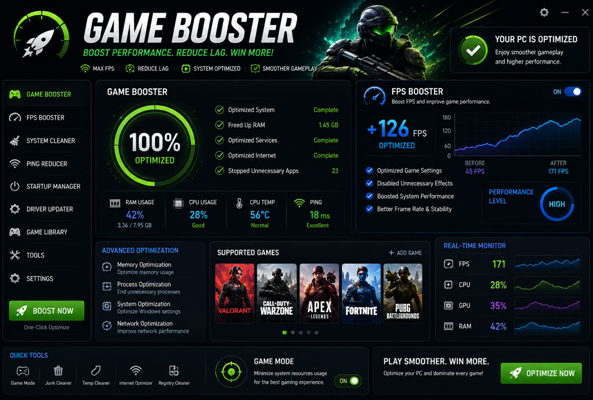
Gaming has become one of the most popular forms of entertainment on smartphones and computers. Games such as PUBG Mobile, Free Fire, Call of Duty Mobile, Fortnite, and other high-graphics games require good performance to run smoothly. However, players often experience lag, frame drops, overheating, slow response, and stuttering during gameplay. Game Booster and FPS Booster tools are designed to help optimize gaming performance and provide a smoother experience.
1. Game Booster
A Game Booster is a feature or application that optimizes a device specifically for gaming. When a game is launched, a Game Booster can help manage system resources such as RAM, CPU usage, and background applications. Its main purpose is to give the game better access to available resources and reduce unnecessary processes running in the background.
One of the major benefits of a Game Booster is improved gaming stability. When many applications are running in the background, they may consume RAM and processing power. This can cause games to slow down or become less responsive. A Game Booster can reduce unnecessary background activity, allowing the game to use more of the device’s available resources.
Many modern smartphones already include built-in Game Booster features. These may provide options such as performance mode, notification blocking, touch-response optimization, screen recording, and network optimization. Such features can reduce distractions and make gaming more comfortable.
However, a Game Booster cannot completely overcome a device’s hardware limitations. If a smartphone has limited RAM, an older processor, or a weak graphics processor, installing a Game Booster will not magically turn it into a high-end gaming device. Its effectiveness depends on the device and the game being played.
2. FPS Booster
FPS stands for Frames Per Second. It refers to the number of frames displayed by a game every second. A higher and more stable FPS generally makes gameplay look smoother and feel more responsive.
For example, a game running at 60 FPS usually appears smoother than the same game running at 30 FPS, assuming the device and display support the higher refresh rate. This difference can be particularly noticeable in fast-paced games where quick movements and reactions are important.
An FPS Booster aims to improve frame-rate stability by optimizing graphics settings and device resources. Some tools may recommend lowering demanding visual effects, reducing resolution, or adjusting other graphics settings to achieve more consistent performance.
Stable FPS is especially important for competitive gaming. Frequent frame drops can affect aiming, movement, and reaction time. For this reason, many serious gamers prefer stable FPS over maximum graphics quality.
It is important to remember that not every third-party FPS Booster is reliable. Some applications may provide only basic optimization features, while others may make exaggerated performance claims. Before installing any third-party application, users should check its reputation, permissions, reviews, and security.
Difference Between Game Booster and FPS Booster
Although Game Booster and FPS Booster have similar goals, they are not exactly the same. A Game Booster focuses on overall gaming optimization. It may manage background apps, RAM usage, notifications, system performance, and other device functions.
An FPS Booster, on the other hand, focuses more specifically on frame-rate performance and graphics optimization. Its goal is to make gameplay smoother by helping maintain a more stable FPS.
For example, if your game is slowing down because several background applications are consuming memory, a Game Booster may help. If the main problem is unstable FPS, adjusting graphics settings and optimizing performance may be more useful.
Tips for Improving Gaming Performance
Using a Game Booster or FPS Booster is only one way to improve gaming performance. Players can also follow several simple practices.
First, close unnecessary applications before starting a game. This can free up RAM and reduce background resource usage. Keeping enough free storage space on the device can also help maintain good overall performance.
Second, adjust the game’s graphics settings according to your device. If you experience frequent frame drops, lowering graphics quality, shadows, effects, or resolution may improve FPS stability.
Device temperature is another important factor. Long gaming sessions can cause smartphones and computers to become hot. Excessive heat may reduce performance and cause thermal throttling. Taking short breaks and ensuring proper ventilation can help keep the device at a reasonable temperature.
Keeping the operating system, game, and device drivers updated can also improve compatibility and performance. However, users should only install updates from trusted and official sources.
Conclusion
Game Booster and FPS Booster tools can be useful for players who want a smoother and more stable gaming experience. A Game Booster mainly focuses on overall system optimization, while an FPS Booster concentrates on frame-rate and graphics performance.
However, these tools cannot replace powerful hardware. The best gaming performance usually comes from combining suitable graphics settings, sufficient storage, updated software, proper temperature management, and reliable optimization features. By following these practices, gamers can reduce unnecessary lag and enjoy a more responsive and enjoyable gaming experience.




Post Comment