How Creators Should Budget for AI Tools (Without Buying Six Subscriptions)
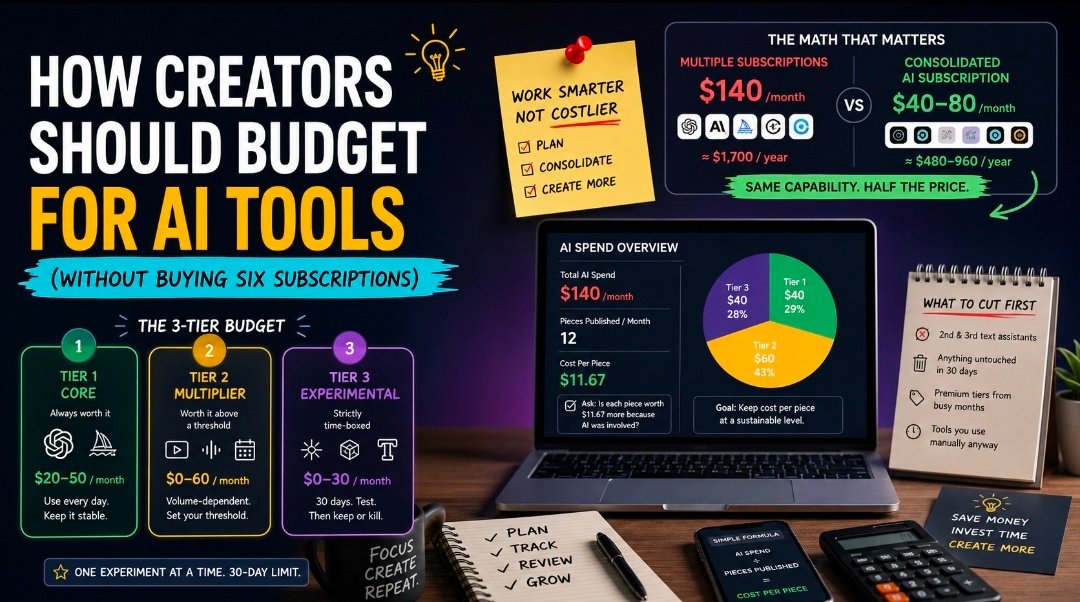
The creator AI stack assembles itself. One subscription for writing, one for research, one for images, one for video, one for the model that handles code snippets better. Each was $20 and felt reasonable in isolation.
Then you total it and it is $140 a month — roughly $1,700 a year — sitting against revenue that may be considerably less predictable than that.
This is not an argument for spending nothing. AI genuinely earns its keep for most working creators. It is an argument for spending deliberately, which almost nobody does, because the spend arrived one small decision at a time.
Start with cost per published thing
Percentage-of-revenue rules are too crude to be useful for creators, whose revenue is lumpy and whose output is not. A better number:
AI spend ÷ pieces published per month = cost per piece
If you publish twelve pieces a month and spend $140, that is $11.67 per piece. Now ask whether each piece is worth $11.67 more to you because AI was involved.
For most working creators the answer is comfortably yes — a piece that takes ninety minutes instead of three hours pays that back immediately. But the number reframes the question productively. You stop asking “is this tool worth $20?” and start asking “is my whole stack worth $12 per output?” That is the question with an actionable answer.
If your output is low and your spend is high, the problem is not the tools. It is that you are paying subscription rates for occasional use.
The three-tier budget
Sort every AI expense into three tiers and treat them completely differently.
Tier 1 — Core (always worth it)
The tools you touch every working day. For most creators this is one capable text model and, if you produce visuals, one image generator.
Budget: $20–50/month. This tier should be boring and stable. Do not optimise it, do not churn it, do not cancel it during a slow month.
Tier 2 — Multiplier (worth it above a threshold)
Tools that pay off only past a certain volume: video generation, voice synthesis, scheduling and repurposing tools, specialised research assistants.
Budget: $0–60/month, volume-dependent. The discipline here is a threshold written down in advance. “If I publish fewer than four videos this month, the video tool goes.” Without a written threshold, these become permanent regardless of use.
Tier 3 — Experimental (strictly time-boxed)
New tools you are trying. Budget them as an experiment with an end date, not as a subscription.
Budget: $0–30/month, hard cap. One experiment at a time, thirty days, then keep or kill. The graveyard of creator finances is Tier 3 purchases that quietly became permanent.
The consolidation move that changes the maths
Here is where most creator stacks are structurally wrong rather than merely large.
The typical setup pays for three or four separate text-model subscriptions — one because it writes better, one because it researches better, one because it handles long documents. Each is a full seat at full price for partial use.
That structure exists because vendors sell whole seats, not because you need whole seats. A multi-model subscription puts several labs’ models behind one account with a shared allowance, and for a creator using each model a few times a week it is straightforwardly cheaper.
Get the actual number rather than estimating. An AI subscription cost calculator lets you tick the plans you currently hold and returns your monthly and annual totals against a consolidated figure. For a creator running three assistants plus an image tool, the gap is usually $40–80 a month — which is, not coincidentally, about the size of the Tier 2 budget most people say they cannot afford.
On price: consolidated multi-model plans generally publish tiered pricing with included allowances starting around $15/month for an individual allowance, rising for heavier use. Check the allowance against your real volume before switching — a plan that runs out in week three is not cheaper, it is just differently annoying.
What to cut first
In order, because the order matters:
- The second and third text assistants. Highest overlap in the entire stack. If you have three, you are almost certainly using one for 80% of the work and keeping two as insurance. Consolidate rather than cancel outright — you want the fallback, you just should not be paying full seat price for it.
- Anything untouched in 30 days. Open your app-store subscriptions and your card statement. There will be at least one. There is always at least one.
- Premium tiers bought during a busy month. You upgraded during a launch and never came back down. Check every tier against what you actually used last month.
- Scheduling and repurposing tools you use manually anyway. Common purchase, low actual usage, easy to reclaim.
Do not cut the tool your entire workflow depends on to save $20. Saving money by making your core process worse is not a saving.
Budgeting for irregular income
Creator income is uneven and AI subscriptions are not. Three practices that help.
Set the floor at your worst month. Your fixed AI stack should be affordable in your slowest month, not your best one. Everything above the floor goes in Tier 2, tied to a volume threshold.
Prefer monthly to annual, in this category specifically. Annual discounts are usually 15–20%, which is real. But AI pricing has moved repeatedly, mostly downward, and capability has moved faster. Locking twelve months in a market this volatile has cost more people than it has saved.
Review quarterly, not annually. Ninety days is long enough to see a pattern and short enough to catch a tool that stopped earning its place.
The honest cost of not using AI
Budgeting discussions skew toward cutting, so it is worth stating the other side.
If AI genuinely reduces a piece from three hours to ninety minutes, and you publish twelve pieces a month, that is eighteen hours. At almost any freelance rate, eighteen hours is worth substantially more than $140. The stack pays for itself several times over.
The mistake is not spending on AI. It is spending on five overlapping tools when two would do — and never checking, because each individual charge was small enough to ignore.
A workable stack for most creators
- One multi-model text subscription covering the major model families under a shared allowance — Tier 1
- One image generator, if visuals are part of your output — Tier 1
- One volume-triggered specialist (video, voice) with a written threshold — Tier 2
- One experiment at a time, thirty-day limit — Tier 3
Total: typically $40–80/month rather than $140. Same capability, roughly half the bill, and considerably fewer logins.
Frequently asked questions
How much should a creator spend on AI tools? Judge it by cost per published piece rather than by absolute spend. If your stack costs more than about 10% of what a piece earns you, look at consolidating before you look at cancelling.
Is one AI subscription enough? One account is usually enough. One model often is not — different models are genuinely better at different tasks. That is precisely the case for a multi-model subscription over a single-vendor one.
Should creators buy annual AI plans for the discount? Generally no. The 15–20% saving is real but small against a category where pricing and capability both move within a year.
What is the most commonly wasted AI subscription? The second and third text assistants, kept as fallbacks for occasional use and paid for as though used daily.
How do I know if my AI spend is too high? Divide by output. If cost per published piece is rising while output is flat, you are accumulating tools rather than capability.
Do this today
Open your card statement, list every AI charge, and sort them into the three tiers. Cancel anything untouched for thirty days. Run the consolidation number on your text assistants.
Fifteen minutes, and most creators find $40 to $80 a month they were not using. That funds the Tier 2 tool you actually wanted.





Post Comment